Sticker Size Guide: How Big Should You Make Your Stickers?
One of the most common questions new sticker makers ask is: "What size should I make my sticker?"
It sounds like there should be a standard answer. Maybe planner stickers should always be a certain size, laptop stickers another, and labels another.
But there isn't one perfect sticker size.
A 3-inch sticker might look fantastic on a laptop and enormous in a planner. A tiny sticker that's perfect beside a planner appointment could make detailed artwork almost impossible to appreciate. Even two stickers used in the same place might need different dimensions because of their shape, text, or level of detail.
So instead of giving you one set of measurements to memorize, here's something much more useful: a simple sticker-sizing framework you can come back to for every project you make.
Save this post somewhere handy. Whenever you're wondering "How big should I make this sticker?", work through these steps:
📌 Placement → Space → Design → Proportion → Test
Once you get used to these five steps, choosing your sticker size becomes much less of a guessing game.
Step 1: Placement
Before you add anything to your design software canvas, ask: Where is this sticker actually going?
This should almost always be your starting point because the purpose of your sticker gives you context for its size.
For example, you might be making a sticker for a(n):
- Planner or journal
- Laptop
- Water bottle or tumbler
- Greeting card
- Envelope
- Storage container
- Gift or package
- Sticker sheet
- Notebook
- Scrapbook page
Picture a cute teacup design. Now imagine the same teacup design being used in three different places.
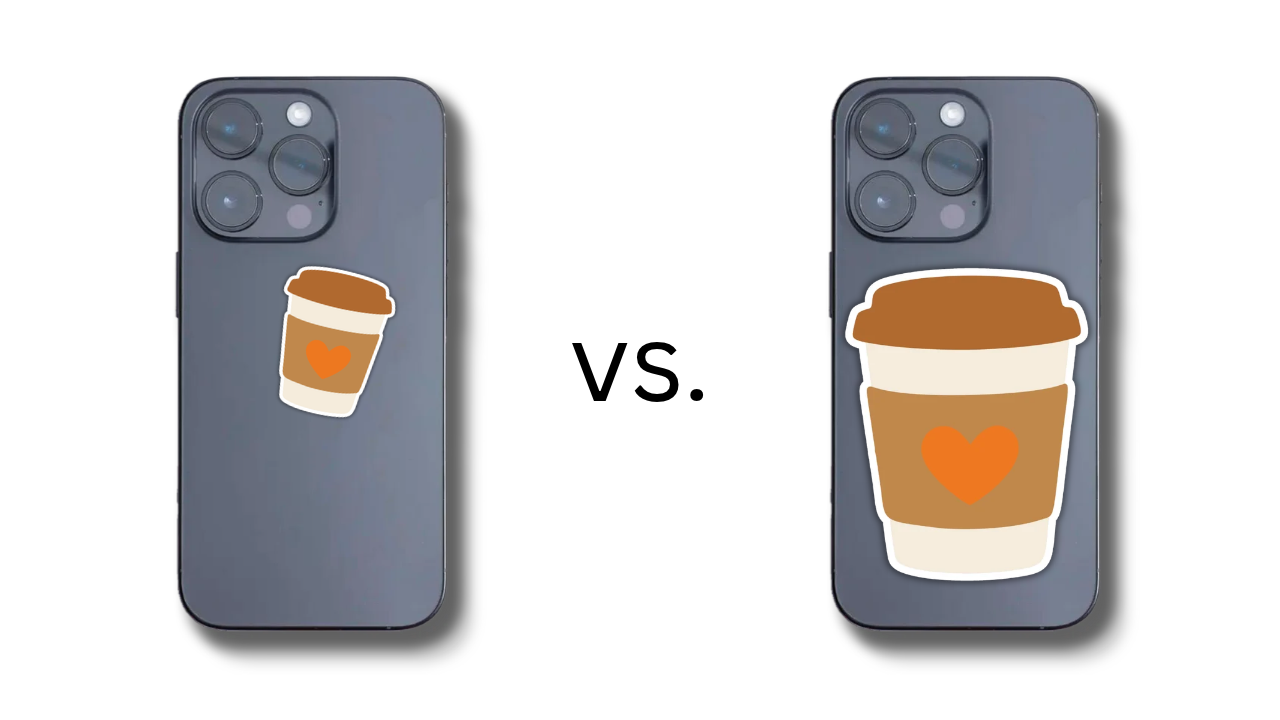
For a monthly planner spread, you might want it quite small so it decorates the page without covering space you need for writing.
For a water bottle, you could make it larger so you can actually see and appreciate the design.
For a laptop, you might make it larger still if you want it to be a focal point.
It's the same teacup. The design hasn't changed, but its intended use has.
That's why asking "What size should a sticker be?" without considering where it will go is a bit like asking what size a photo should be without knowing whether you're putting it in a locket or hanging it over the sofa.
Your first sizing question: Where am I going to use this sticker?
Step 2: Space
Once you know where your sticker is going, look at the actual available space.
This is where you can start turning a vague idea into a useful measurement.
If you're creating a sticker for a particular planner box, measure the box.
If you're labeling a storage container, measure the area where you'd like the label to sit.
If you're decorating a water bottle, look at how much usable surface you have and whether the bottle curves.
For something like a laptop, you may have much more freedom, but you should still think about how much of the surface you actually want the sticker to occupy.
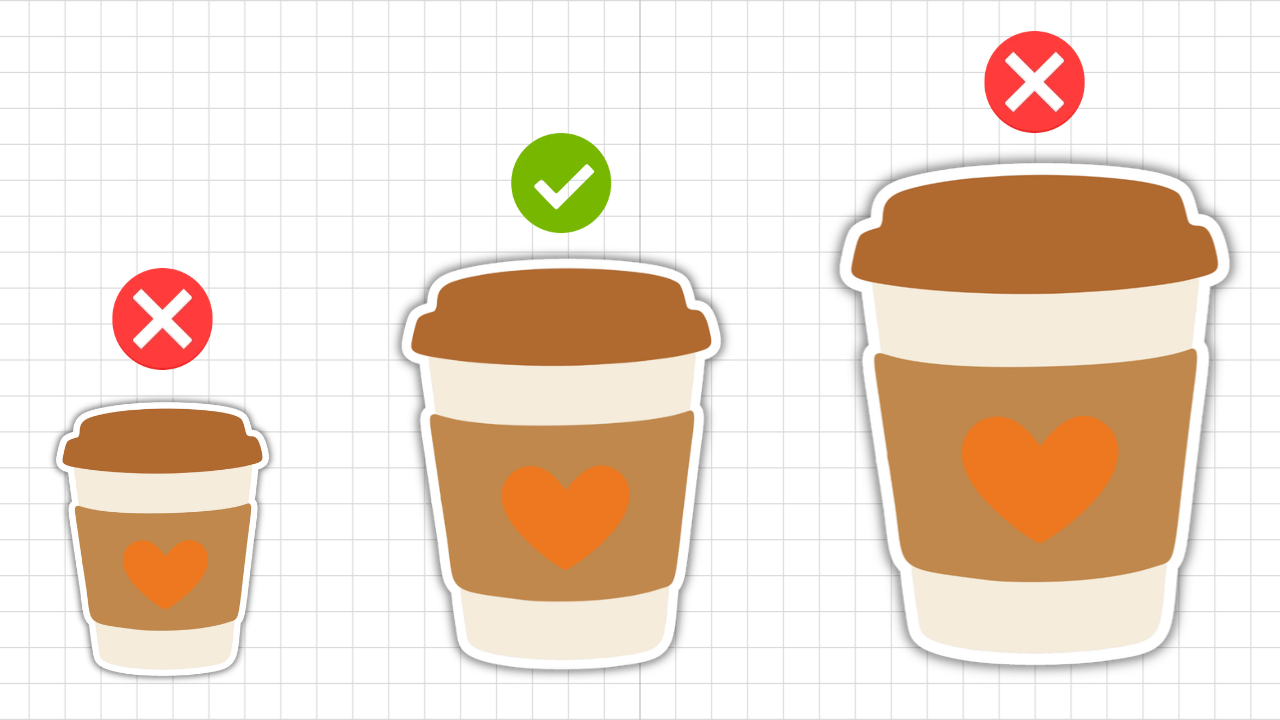
Don't assume that because you have four inches of available space, you need a four-inch sticker either. Available space gives you an upper boundary, not necessarily your finished measurement.
A little breathing room around the design can make the finished sticker look much more balanced.
Your second sizing question: How much usable space do I actually have?
Step 3: Design
Now turn your attention from the surface to the sticker itself. Some designs work beautifully when they're tiny. Others need more room.
Look at the amount of detail
A simple heart, star, flower, or functional planner icon can often be made quite small while remaining recognizable.
But imagine shrinking a detailed illustration containing flowers, leaves, tiny decorative elements, and lettering to the same size.
You might technically be able to make it that small, but that doesn't mean you should.
As a design gets smaller:
- Fine details become harder to see
- Small text becomes harder to read
- Thin lines may be less noticeable
- Intricate cut shapes become more challenging
- The overall design can start to feel crowded
Think about what you want someone to notice about the sticker. If those details disappear when you reduce the size, you've probably gone too small.
Pay particular attention to text
Text gives you another useful clue.
Suppose you're making a tiny planner sticker that simply says "PAYDAY" in clear, bold lettering. You may be able to make it relatively small while keeping it readable.
A decorative sticker featuring a longer phrase needs more room.
Don't choose the sticker dimensions first and then force your text to fit inside them. Adjust the overall sticker size until the text can comfortably be read at its actual printed size.
Consider the cut, too
Very small and intricate stickers can also ask more of your cutting machine.
A larger, smooth outline will generally be more forgiving than lots of tiny bumps, narrow sections, and complicated edges squeezed into a very small space.
So don't only ask whether your design looks good at that size. Think about how practical it will be to print, cut, peel, and use.
Your third sizing question: At this size, can I still clearly see, read, cut, and use the design?
If not, go bigger.
Step 4: Proportion
By now, you should have a reasonable idea of your sticker's size.
But there's another consideration that's harder to capture with a single measurement: proportion.
Imagine you're making a name label for a wide storage container.
You could make a 2-inch circular sticker, and it might technically fit. But a wider rectangular label could look much more natural on that particular surface.
Or imagine putting a large decorative sticker in a planner. It might fit on the page, but if it dominates everything around it, it may not work for the way you use your planner.
Look at your sticker in context and ask: Does this size look right here?
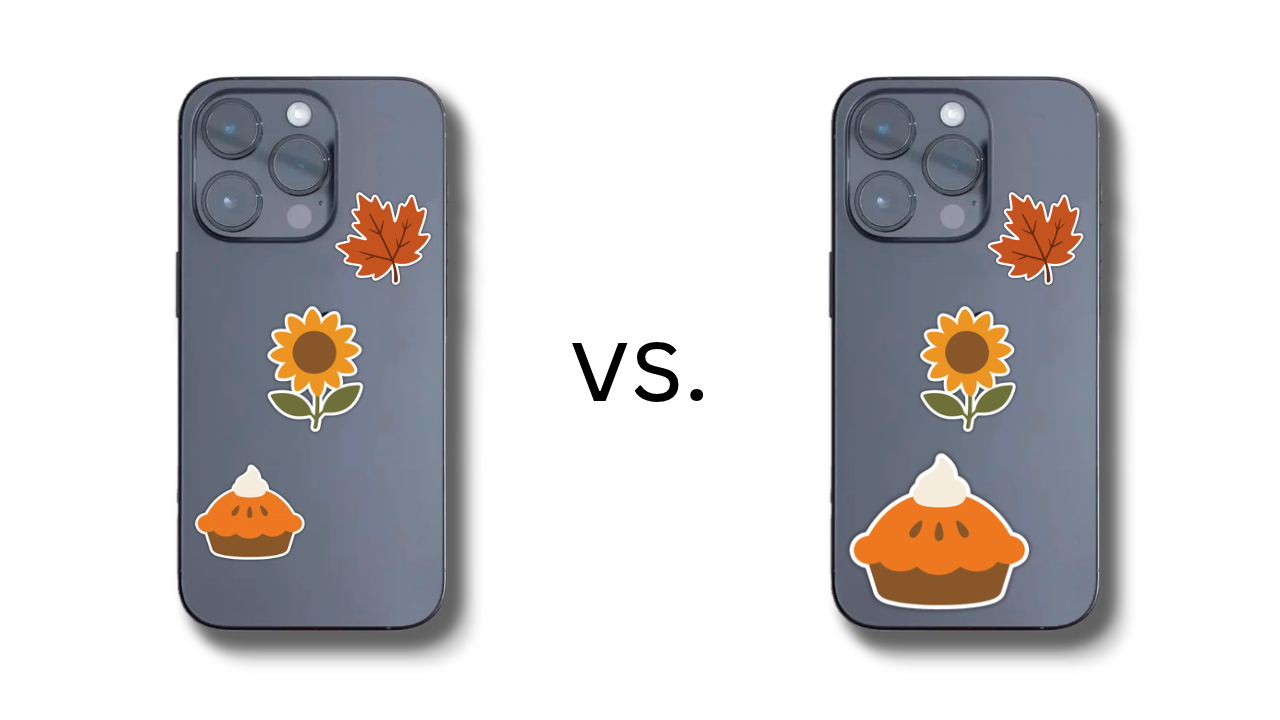
You're considering the relationship between the sticker and everything around it.
You might decide you want it to:
- Be the main focal point
- Add a small decorative accent
- Fit neatly beside other stickers
- Leave room for handwriting
- Fill most of an available surface
- Coordinate with other stickers in a set
There isn't an objective rule saying that your sticker should fill a particular percentage of the available space.
Instead, decide what job you want it to do visually.
Your fourth sizing question: How prominent do I want this sticker to be?
Step 5: Test
When you're still unsure, print a text on ordinary printer paper.
You don't need to use your good sticker paper yet.
Try printing your design at the size you're considering. If you're deciding between two or three measurements, print all three.
Then roughly cut around them with scissors and place them where you intend to use the finished sticker.
Put the planner sticker on your planner page. Hold the laptop sticker against your laptop. Place the label on the storage container. Tape the decorative sticker temporarily to your notebook.
Seeing a design at its actual physical size is completely different from seeing it zoomed in on a computer screen.
Your screen can make a tiny sticker look enormous while you're designing it. A physical test immediately gives you perspective.
You may look at your test and think: That's much smaller than I imagined. Or you'll think: Oh! That's taking up the whole space.
Great! Now you know, and you've used a few cents' worth of ordinary paper rather than your sticker materials.
Your fifth sizing question: Have I seen this design at its actual finished size?
When you're unsure, test before committing.
📌 The Sticker Size Framework (Save this for your next project)
Here's the entire process in one place:
- Placement: Where will this sticker be used?
- Space: How much usable space is available?
- Design: Can I clearly see, read, cut, and use the design at this size?
- Proportion: How prominent do I want the sticker to look in that space?
- Test: Have I printed or viewed it at its actual finished size?
The same five steps can help whether you're creating a tiny planner icon today, a water bottle sticker next month, or a storage label six months from now.
Bookmark this post, save the five questions in your sticker-making notes, or write them on a card to keep beside your computer.
The goal is for the framework to become something you can reuse every time you're choosing sticker dimensions, rather than having to search for an answer again with every new project.
Sticker Size Starting Points
I know what some of you are thinking: That's helpful, Mim, but can't you just give me some numbers?!
These aren't rules, and they're deliberately broad. Think of them as starting points to test, not measurements your stickers have to follow.
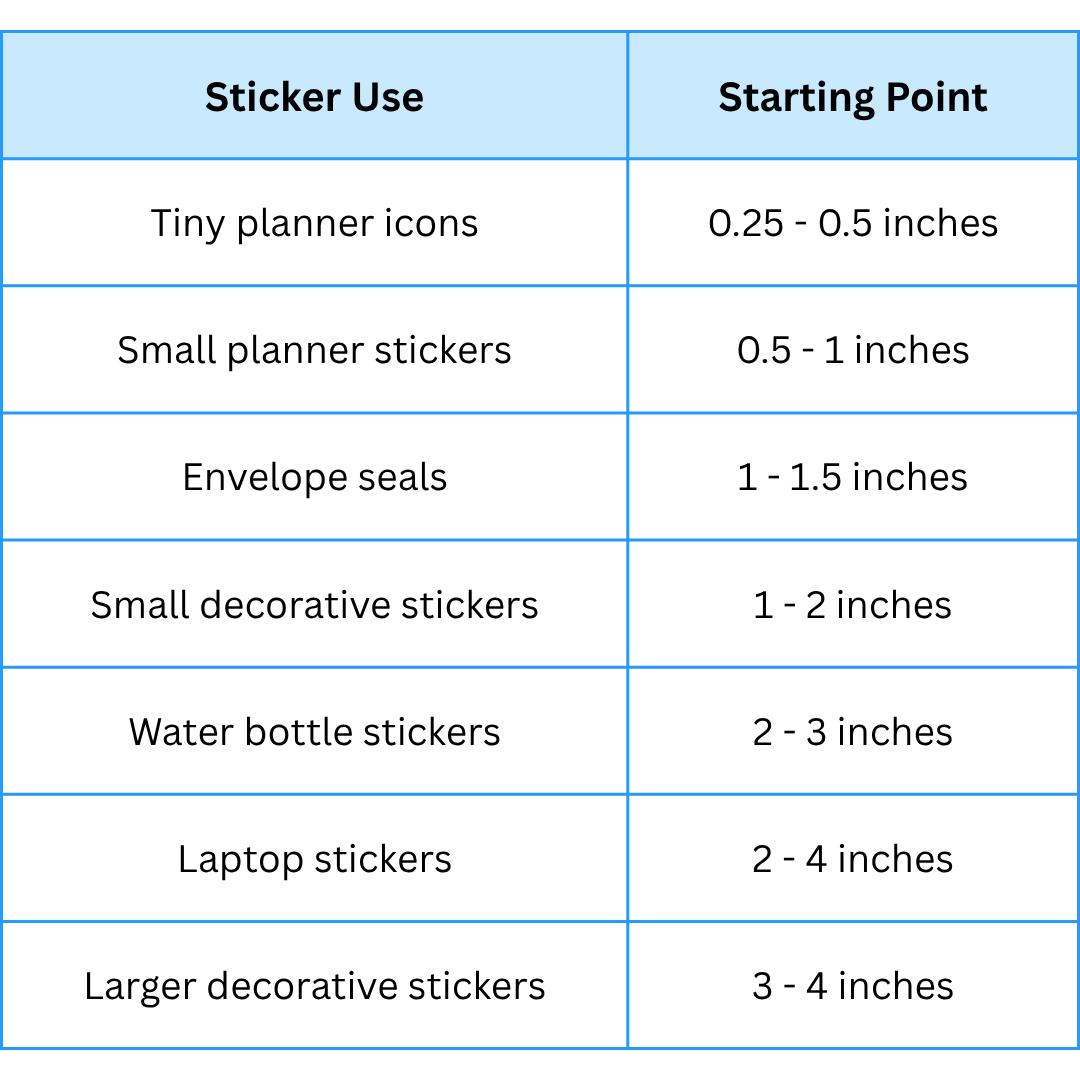
For labels, I'd be especially cautious able relying on standard dimensions. The right size depends heavily on what you're labeling and the space available, so measure the intended surface first.
A remember that these measurements don't override the framework.
A detailed 1-inch sticker might still be too small. A simple 3-inch laptop sticker might look lost on a large surface. A 0.5-inch planner sticker might be perfect in one planner and awkward in another.
Start with the range, then use the five questions to find your finished size.
Sticker Sizing FAQ
✂️ Do all stickers on a sticker sheet need to be the same size?
Not at all. In fact, varying the sizes can make a sticker sheet much more useful.
You could have:
- Larger decorative stickers that become focal points
- Medium stickers for everyday decorating
- Small icons for planners and calendars
- Tiny accent stickers for filling little spaces
The important thing is that each sticker works at its own finished size.
Don't shrink an intricate design simply because you want everything on the sheet to match. Likewise, don't enlarge a simple little icon unnecessarily just because another design needs more room.
Judge each sticker using the same Placement → Space → Design → Proportion → Test framework.
✂️ Should I design my sticker first or choose the size first?
Either can work, but if you already know exactly where the sticker will be used, start with the available space.
For example, if you're designing something specifically to fit a certain planner box or label a particular container, measuring first prevents you from creating a beautiful design that doesn't work in its intended location.
If you're creating a decorative sticker without a particular destination in mind, you have more flexibility. Create your design, then experiment with its finished dimensions while paying attention to detail, readability, and cut complexity.
The framework still works. You're simply entering it with different information.
✂️ What if I want to make the same sticker in different sizes?
Go for it!
One of the lovely things about making your own stickers is that you aren't limited to one finished size.
You could make the same flower at 0.75 inches for your planner, 2 inches for a notebook, and 3 inches for your laptop.
But don't assume that scaling artwork up and down will always produce equally good results.
Check each version separately:
- Is the text still readable on the smallest one?
- Do fine details still work?
- Does the larger version reveal imperfections you couldn't see before?
- Will your cutting machine handle the smallest outline nicely?
Same design, different size, same five-question check.
Ready to Build Your Sticker-Making Skills?
Choosing the right sticker size is just one of the many decisions that gets easier once you understand the sticker-making process from start to finish.
If you'd love more step-by-step help, Sticker Making 101 is my comprehensive beginner-friendly course designed to help you confidently make your own stickers at home.
Inside, you'll learn how to:
- Choose the supplies and equipment you need without getting overwhelmed
- Create and customize your own stickers using simple techniques
- Print your stickers at home and understand the settings that matter
- Cut your stickers successfully with your cutting machine
- Troubleshoot common sticker-making problems as you learn
You'll also have starter templates to help you begin creating without having to design everything from scratch.
So if you're thinking, "I want to make stickers, but I don't know where to start," Sticker Making 101 gives you a clear path to follow and the confidence to keep creating on your own.
Learn more about Sticker Making 101 →
There's No Single "Correct" Sticker Size
It can feel reassuring to have someone tell you, “Make this sticker exactly two inches wide.”
Sometimes that's useful. But it doesn't teach you what to do when your next project is completely different.
That's why learning how to decide what size a sticker should be is much more valuable than memorizing a list of standard measurements.
Remember:
📌 Placement → Space → Design → Proportion → Test
Use those same five steps again and again, and soon choosing sticker sizes will feel much less like guessing and much more like making a simple creative decision.
JOIN THE COMMUNITY:
Learn to make stickers from scratch that you're proud to use a share!